

After you have successfully created your website, the next thing you’re concerned about is getting it visible on search engines like Google. This way, your target audience can discover you, trust you, and patronize your services. This process you are about to start (or engage in) is called on-page SEO.
Table of Contents
on-page SEO best practices in 2026
On-page SEO is the practice of improving individual web pages to rank higher in search engines and attract more targeted visitors. It includes everything you control directly on your page, from content quality to HTML tags and site structure.
When someone searches for “how to make French salad,” Google decides which pages deserve the top spots. On-page SEO helps search engines understand that your content deserves to rank by making it clear, helpful, and easy to read.
What is on-page SEO?
What is on-page SEO
On-page SEO (aka on-site SEO) is simply optimizing the content of a webpage. This way, when your target audience searches for a term, it’s worthy enough for search engine bots to rank it on the first page of SERPs.
For example, your target audience makes a search query: “How do I make a French salad?” and you have in-depth, valuable content that answers this question, Google can rank it above other pages for the reader.
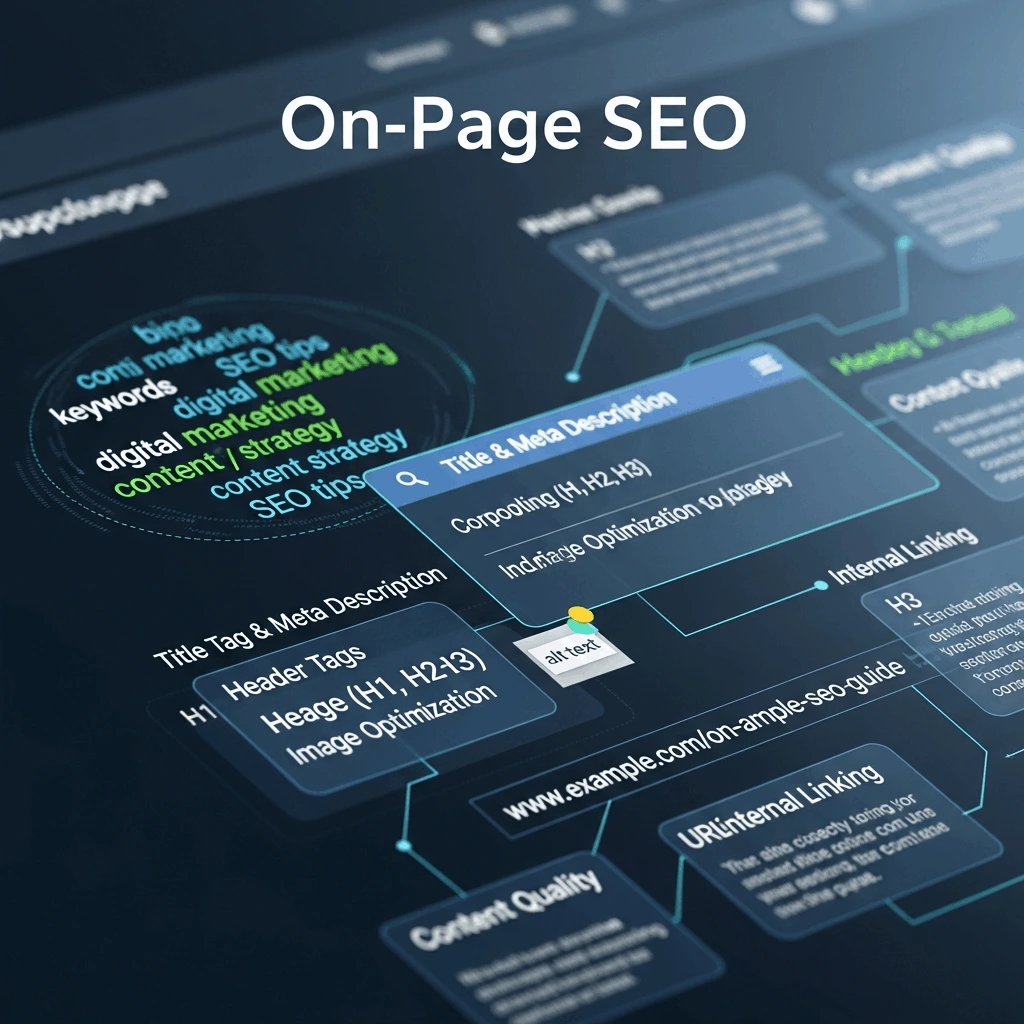
On-page SEO deals with the elements you can fully control on your page. It covers everything from the title tag, meta description, header tags, keyword usage and density, content structure, internal and external linking, image optimization, and other elements.
Why On-Page SEO Still Matters in 2026?
Search has changed with AI-powered results, but on-page SEO remains the foundation of visibility. Here’s why it matters now more than ever:
1. Top rankings drive most clicks
The first organic result on Google gets 39.8% of all clicks, while the second position receives just 18.7%, and the third gets 10.2%. Moving from position 4 to position 1 can triple your traffic overnight.
2. Better Titles Increase Click Rates by 30%
Your title tag is the first thing people see in search results. A clear, benefit-driven title can boost your click-through rate by up to 30% compared to generic titles. This matters because higher click rates signal to Google that your page satisfies user intent.
3. Well-Structured Content Ranks for 1,000+ Keywords
A single optimized page can rank for hundreds of related search terms. Pages in the top 3 positions typically rank for over 1,000 keyword variations, bringing traffic from searches you never directly targeted.
4. AI Search Favors Clear, Direct Answers
Google’s AI overviews, ChatGPT search, and voice assistants pull information from well-structured pages. Content with clear headings, concise answers, and logical flow gets featured more often in AI-generated responses.
The 9 Essential On-Page SEO Factors (2026 Edition)
1. Start with smart keyword research
keyword research process
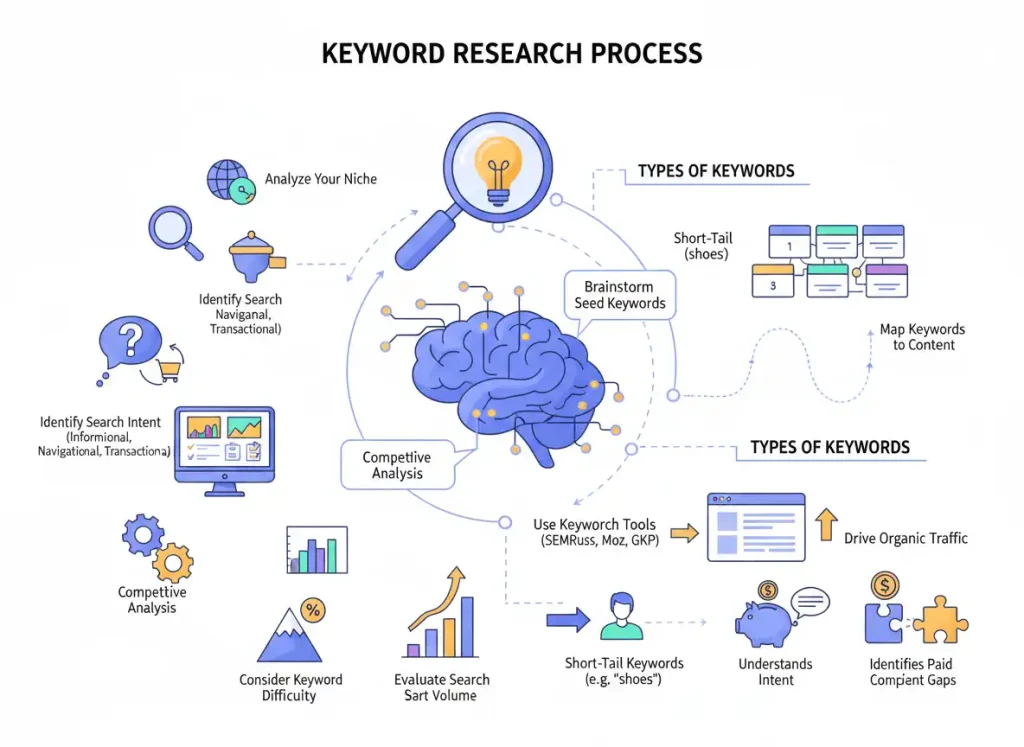
Keywords are the search terms your audience types into Google. Finding the right ones means understanding what people actually search for and choosing terms you can realistically rank for.
Two types of keywords exist:
Short-tail keywords have high search volume but fierce competition. Examples: “shoes,” “marketing,” “laptops.”
Long-tail keywords have lower volume but are easier to rank for and often convert better. Examples: “best running shoes for flat feet 2026,” “email marketing tips for small business.”
How to find the right keywords:
Use keyword research tools like Google Keyword Planner, Ubersuggest, Ahrefs, or SEMrush. Type your major topic into the tool, and it shows search volume, difficulty, and cost-per-click data for related terms.
Your goal is not to chase the highest volume. Instead, find keywords that match clear search intent, have manageable competition, and fit your content purpose.
Check the “People also ask” box on Google. When you search for any term, Google shows related questions that people ask. Use these as secondary keywords and answer them in your content.
Install keyword research extensions like Keywords Everywhere or Keyword Surfer. These Chrome tools show related searches and metrics directly on your Google results page.
Understanding search intent matters more than volume. Someone searching “buy Nike running shoes” has a different intent than someone searching “how do running shoes work.” Match your content to what the searcher actually wants.
2. Optimize Your Title Tag and Meta Description
Your title tag is the clickable headline in search results. Your meta description is the preview text below it. Both need your focus keyword and must make people want to click.
Title tag rules:
Keep it between 50-60 characters so it doesn’t get cut off in search results.
Include your main keyword near the beginning.
Make it compelling and specific, not generic.
Example: Instead of “SEO Tips,” write “7 On-Page SEO Tips That Increased Our Traffic by 300%”
Meta description rules:
Keep it between 150-160 characters.
Include your focus keyword naturally.
Write it like an ad that promises value.
Example: “Learn the exact on-page SEO checklist we used to rank 47 keywords in the top 3 positions. Step-by-step guide with authentic examples.”
Both elements should be unique for every page on your site. Duplicate titles and descriptions hurt your rankings.
3. Use keywords in headings and the introduction
Your main heading (H1) should include your primary keyword and tell readers exactly what they’ll learn. Most times, your H1 matches your title tag.
Your introduction should hook readers immediately and include your focus keyword in the first 100 words. Get straight to the point and promise value.
Subheading structure (H2, H3) should:
Break content into scannable sections.
Include primary and related keywords naturally.
Answer specific questions your audience asks.
Use descriptive language that makes sense on its own.
Example: Instead of “Tips” as an H2, write “5 Proven Ways to Speed Up Your WordPress Site”
Search engines use headings to understand your content’s structure. Readers use them to scan and find relevant sections. Both matter equally.
4. Create Content That Actually Helps People
create high-quality, helpful content
This is the most important factor. Everything else fails if your content doesn’t deliver real value.
Research your audience deeply. Know their age range, problems, objections, goals, and language. Read comments on competitor blogs, check Reddit discussions, browse Quora questions, and watch YouTube videos on your topic.
Make your content comprehensive:
Answer the main question completely in the first 200 words.
Cover related questions people have about the topic.
Include real examples, recent statistics, expert insights, and case studies.
Write 1,500 to 2,500 words for competitive topics (but only if needed – don’t add fluff).
Use simple language that an 8th grader can understand.
Content quality signals Google looks for:
Original insights, not rehashed information from other sites.
Depth that covers subtopics and related questions.
Freshness with current examples and updated data.
Accuracy with facts backed by credible sources.
User engagement is shown by time on page and low bounce rates.
Address search intent directly. If someone searches “how to,” give them a step-by-step process. If they search “best,” give them a comparison with pros and cons. If they search “what is,” give them a clear definition with context.
5. Add Images and Videos (Optimized Correctly)
Visual content makes your page easier to understand and more engaging. It also gives you extra ranking opportunities through image search.
Where to find free images:
Unsplash, Pexels, Pixabay, and Libreshot offer high-quality stock photos you can use without attribution.
Before uploading any image:
Compress it to 50-100 KB using tools like TinyPNG or ImageOptim. If your images are too large, your website will be slow, negatively affecting its search ranking and how easy it is for people to use.
Rename the file to include your keyword. Change “IMG_1234.jpg” to “on-page-seo-checklist.webp”
Add descriptive alt text that explains what the image shows. This helps visually impaired users and gives search engines context.
Video optimization:
Embed videos from YouTube or Vimeo rather than uploading directly (saves bandwidth).
Add a transcript below the video for accessibility and SEO.
Create a custom thumbnail with text that explains the video content.
Images and videos increase time on page, which signals to Google that your content engages readers.
6. Link Internally and Externally
Links help search engines discover your pages and understand how your content connects. They also help readers find related information.
Internal linking (linking to your own pages):
Link from new content to older related posts to spread ranking power.
Use descriptive anchor text that includes keywords. Instead of “click here,” write “learn how to write meta descriptions.”
Add 3-5 internal links per 1,000 words of content.
Link to pages you want to rank higher (your important content).
External linking (linking to other websites):
Link to authoritative sources that support your claims (research studies, industry reports, expert articles).
Choose reputable sites like government sources, universities, established news outlets, and recognized industry leaders.
Use the same descriptive anchor text approach.
External links show Google you’ve done research and built trust with readers.
Link placement matters. Links in the main content carry more weight than links in sidebars or footers. Place your most important internal links early in the article where readers are most engaged.
7. Optimize Your URL Structure
Your URL is the web address of your page. Clean URLs help both search engines and users understand what your page covers.
URL optimization rules:
Keep URLs short and readable (under 60 characters when possible).
Use hyphens between words, not underscores or spaces.
Include your main keyword.
Remove unnecessary words like “and,” “the,” and “of.”
Use lowercase letters only.
Examples:
Poor URL: yoursite.com/p=1234?page&seo_content
Good URL: yoursite.com/on-page-seo-guide
Once you publish a page, avoid changing the URL. If you must change it, set up a 301 redirect from the old URL to the new one so you don’t lose rankings or break existing links.
8. Improve Page Speed and Mobile Experience
Google uses page speed and mobile friendliness as ranking factors. Slow pages frustrate users and get ranked lower.
Speed optimization basics:
Compress images before uploading (mentioned earlier, but worth repeating).
Use browser caching so returning visitors load your page faster.
Minimize CSS and JavaScript files.
Choose fast web hosting (shared hosting often slows you down).
Use a content delivery network (CDN) for larger sites.
Mobile optimization:
Use a responsive design that adapts to all screen sizes.
Make buttons and links easy to tap (at least 48×48 pixels).
Avoid pop-ups that cover the whole screen on mobile.
Test your site on actual phones, not just desktop browser resize.
You can test your page speed at PageSpeed Insights and check mobile friendliness in Google Search Console.
9. Add Schema Markup for Rich Results
Schema markup is code you add to your page that helps search engines understand your content type. It can get you rich results like star ratings, FAQ snippets, and recipe cards in search results.
Common schema types:
Article schema for blog posts and news content.
FAQ schema for frequently asked questions.
How-to schema for step-by-step guides.
Product schema for items you sell.
Review the schema for product or service reviews.
You can generate schema markup using Google’s Schema Markup Generator or plugins like Rank Math and Yoast SEO for WordPress.
Rich results take up more space in search results and get higher click rates. Not every page qualifies, but adding schema where appropriate gives you an edge.
AI Search Optimization: The New Frontier
Traditional SEO still works, but AI-powered search is changing how people find information. Here’s how to optimize for AI overviews, ChatGPT, and voice search:
Answer questions directly and concisely. AI tools favor content that gets to the point quickly. Start sections with clear answers, then provide supporting details.
Use conversational language. People ask AI tools questions like they’re talking to a person. Include natural question phrases in your content, like “How do you…” and “What is the best way to…”
Structure information clearly. Use tables, bullet lists, and numbered steps where appropriate. AI tools parse structured content more easily.
Include comparison information. AI searches often ask “which is better” or “what’s the difference between.” Add comparison sections to your content.
Stay factually accurate. AI tools cross-reference information. Errors or outdated facts hurt your credibility and ranking potential.
5 Common On-Page SEO Mistakes to Avoid
1. Publishing Thin Content
Articles under 500 words rarely provide enough value to rank well. Google wants comprehensive content that fully answers the search query. Aim for depth over brevity, but don’t add filler just to hit a word count.
2. Using Heavy, Uncompressed Images
Large image files slow your page load time significantly. This increases bounce rate as impatient visitors leave, which signals poor quality to Google. Always compress images to 50-100 KB before uploading.
3. Writing Vague Anchor Text
When you link to another page, make the clickable text descriptive. “Click here” tells search engines nothing. “Learn our 7-step keyword research process” tells both users and search engines exactly what they’ll find.
4. Ignoring Your Target Audience
Long content means nothing if it doesn’t match what your audience needs. Writing for “everyone” means you connect with no one. Research your specific audience’s age, problems, language, and preferences before writing.
5. Stuffing Keywords Unnaturally
Forcing your keyword into every sentence makes the content unreadable and triggers spam filters. Use keywords naturally where they make sense. Include related terms and synonyms instead of repeating the exact phrase endlessly.
Your On-Page SEO Checklist
Before publishing any page, run through this checklist:
Content Quality:
- Does this fully answer the search query?
- Have I included examples, data, or expert insights?
- Is the information accurate and up to date?
- Would I find this helpful if I were searching for this topic?
Keyword Optimization:
- Is my focus keyword in the title tag, H1, and the first 100 words?
- Have I used related keywords naturally throughout?
- Are my subheadings descriptive and keyword-rich?
- Does my URL include the main keyword?
Technical Elements:
- Is my title tag 50-60 characters?
- Is my meta description 150-160 characters?
- Are all images compressed and have alt text?
- Have I added 3-5 internal links with descriptive anchors?
- Did I link to 2-3 authoritative external sources?
User Experience:
- Does my page load in under 3 seconds?
- Is the content easy to scan with headings and short paragraphs?
- Does it work well on mobile devices?
- Have I broken up text with images or videos?
AI and Rich Results:
- Have I answered common questions directly?
- Did I add the FAQ schema if appropriate?
- Is the content structured for easy parsing?
- Have I included comparison or how-to information?
Frequently Asked Questions
What’s the difference between on-page and off-page SEO?
On-page SEO includes everything on your website that you control directly (content, HTML, site structure). Off-page SEO includes external factors like backlinks from other sites, social signals, and brand mentions. Both matter, but on-page SEO is your foundation.
How often should I update my content?
Update content when information becomes outdated, when you have new insights to add, or when rankings drop. For evergreen topics, review every 6-12 months. For fast-changing topics like tech or news, update monthly. Add update dates to show freshness.
How long should my content be for good SEO?
Aim for 1,500 to 2,500 words for competitive topics, but quality matters more than length. Your content should be as long as needed to fully answer the question without adding unnecessary filler. Some topics need 500 words while others require 3,000 words.
Do I need to hire an SEO expert?
You can handle basic on-page SEO yourself using this guide. Consider hiring an expert if you’re in a very competitive industry, need technical SEO fixes, want to scale quickly, or don’t have time to learn SEO properly.
How long does it take to see SEO results?
Most sites see initial improvements in 3-6 months. Competitive keywords may take 6-12 months. New sites take longer than established sites. Keep creating quality content consistently, and you’ll see gradual growth over time.
Start optimizing your pages today
While not complicated, on-page SEO requires close attention and sustained effort. Start with your most important pages and work through this guide step by step.
Focus on creating genuinely helpful content first, then optimize the technical elements. Search engines reward pages that serve users well, and that principle hasn’t changed even as AI reshapes search.
Pick one page this week and apply these on-page SEO techniques. Track your rankings over the next 90 days, and you’ll see the difference proper optimization makes.
Conclusion
On-page SEO is essential if you want to improve your website’s visibility and attract consistent organic clicks. By focusing on key factors such as keyword research, metadata optimisation, high-quality content creation, descriptive anchor text, and other critical elements, while avoiding common on-page SEO mistakes, you ensure that your SEO efforts deliver real, measurable results.
If you’re tired of ranking at the bottom of search results and losing valuable organic traffic, it’s time to change that narrative. FuturePeak Digital works with experienced SEO content marketers who help brands increase visibility, attract the right audience, and convert traffic into sales through strategic, SEO-optimised content.
Ready to grow your website’s organic traffic? Visit our website to book a free strategy call today and get started.